
Overview
This project was an experimental beta built to test hypotheses fast. Its aim was to use a minimum viable product (MVP) to validate market acceptance of automated matching between competency models and learning content (hereafter, C&C), to inform the direction of later product improvements.
Background
GLOBIS Unlimited had built a solid base of adoption in the corporate market, but we saw a key gap: a company rolling out the product doesn’t mean its employees actually use it. Among existing corporate clients, the share of employees who actually used the product (hereafter, internal coverage) had long been low.
If this gap persisted, corporate clients would struggle to see the value of the product, which would affect their willingness to renew. That is why internal coverage was one of our department’s core metrics on the corporate side.
To find ways to raise coverage, the PO and the UX Researcher interviewed companies with more than 1,000 employees that were in active discussions with our dedicated Customer Success team (hereafter, CS) about how to encourage employee learning. This way, product improvements could prioritize the needs of large corporate clients that were actively promoting in-house learning.
Friction points from the interviews, and our hypotheses
HR side: High operating cost
HR wanted to foster a culture of self-directed learning in the company, but under heavy workloads, they struggled to keep promoting the learning platform and tracking employees’ learning. We hypothesized that HR didn’t lack the will to drive learning; they lacked a manageable way to do it. With so many courses, picking the right learning content for employees was extremely time-consuming and had relied heavily on manually curating and matching courses for each company, which was labor-intensive and hard to scale.
Employee side: Low motivation to learn
Employees were stretched thin by short-term work goals and lacked the time and energy to invest in medium- to long-term skill development. We hypothesized that employees didn’t reject the value of learning; they just couldn’t see the connection. Learning on the platform had nothing to do with their short-term goals or performance reviews, so they weren’t willing to spend their limited time on it.
Solution
To address these hypotheses, the team decided to focus new feature development on two goals: lowering HR’s operating cost and making learning relevant to employees.
- Automated matching to competency models (HR side)
- Build a low-barrier automation tool that lets HR match GLOBIS Unlimited’s learning content to their company’s competency model on their own, without much effort, lowering the operating cost of assigning learning content.
- Connecting learning to careers (employee side)
- Help employees see how their assigned learning content connects to their own career development by matching that content to competencies.
Key design decisions
※ For the design process and team collaboration methods used in this project, see Introducing a user story framework in agile development so cross-functional teams align on direction before work begins
- Leaving competency model hierarchies out of scope to validate faster
While reviewing clients’ competency models, we found that the hierarchical structure of competency models differs from company to company. Some companies have only two layers, job level and grade, while others further separate competency descriptions by job function within the same job level and grade. Supporting every client’s structure would have required significant resources for custom development.
Because the goal this time was to get market feedback as soon as possible rather than to build a complete feature, I proposed launching the beta with a single-level structure and leaving hierarchies for later, and the team agreed. As long as clients could match part of their competency model to courses and distribute the matched learning content to employees, we could get real feedback from the corporate HR admin side.
- Making the AI’s matching results explainable: course tags as the basis for its judgment
C&C’s AI doesn’t pick courses directly. It first identifies the course tags that best match the competency descriptions HR enters and then matches courses through those tags (the next decision explains why). The course tags therefore serve as the AI’s summary of HR’s input, so I designed the matching results screen to show them as the basis for the AI’s judgment, letting HR quickly check whether the results match their expectations:
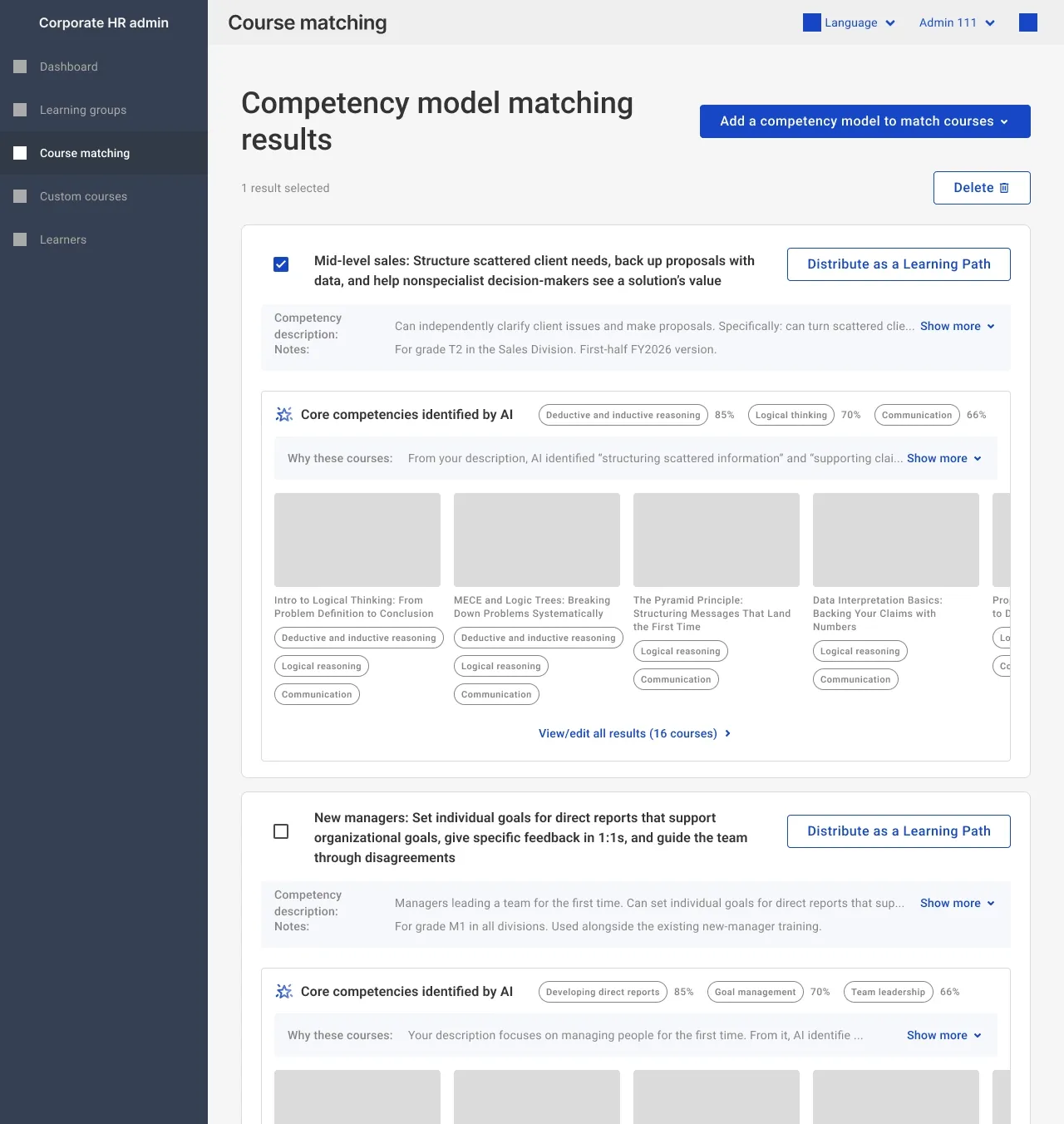
- The “core competencies” shown are the course tags the AI matched to HR’s description, so HR can check whether the AI understood it correctly.
- The tags on each course card explain why that course was selected, so HR can decide course by course whether to keep it, instead of facing a list they have no way to evaluate.
- Using course tags to support AI recommendations while managing computing cost and improving reliability
In the cross-functional workshop, engineers raised two major technical concerns about using AI to match courses directly:
Low accuracy: Without structured prompts, the AI models available at the time tended to hallucinate, producing irrelevant recommendations that would undermine HR’s trust in the product.
Very high computing cost: Sending data for thousands of courses to the AI for every match would not only incur very high token costs but also cause serious system latency.
So the team decided not to have the AI work with the full course catalog directly, but to use the system’s existing course tags as an intermediary. The AI only needs to identify the tags that best match the competency descriptions HR enters, and courses are matched through those tags, so recommendations always come from the existing course library. This design greatly reduced the amount of processing the AI had to do and cut the cost of running the feature going forward. This was a team decision; my responsibility was how the tags were presented on screen, as described in the previous point.
- Using the empty state as a tutorial to reduce resistance to a new concept
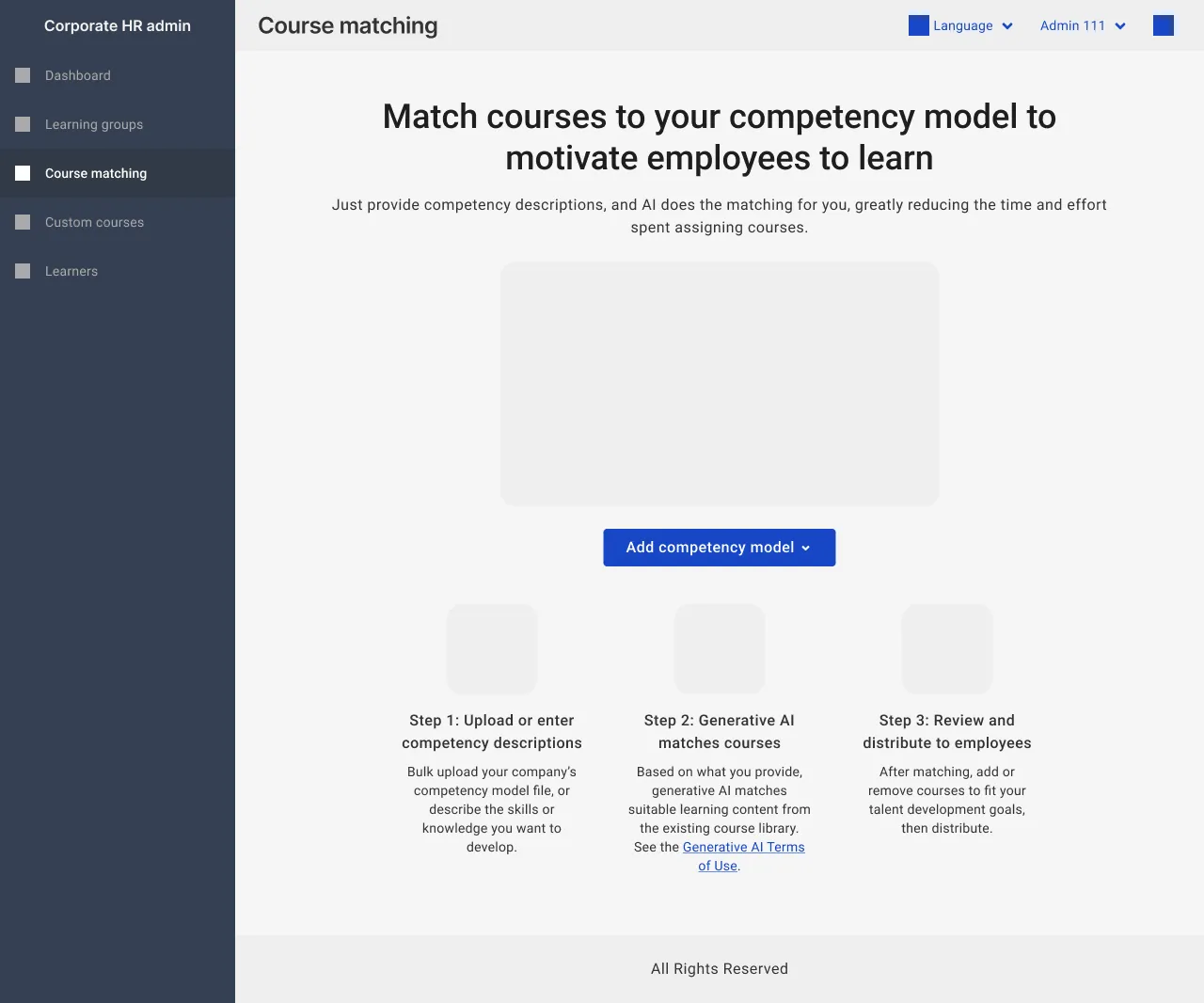
Automatically matching competency models to learning content was a completely new experience for most HR staff, who relied on matching courses manually. To lower the barrier to understanding the new feature, I designed an instructional empty state for the feature’s landing screen. Shown before first use, it clearly explained how the feature replaced manual matching. This aimed to reduce HR’s resistance to the new concept and encourage them to try it.
- Offering two ways to enter competency descriptions, balancing scale and immediacy
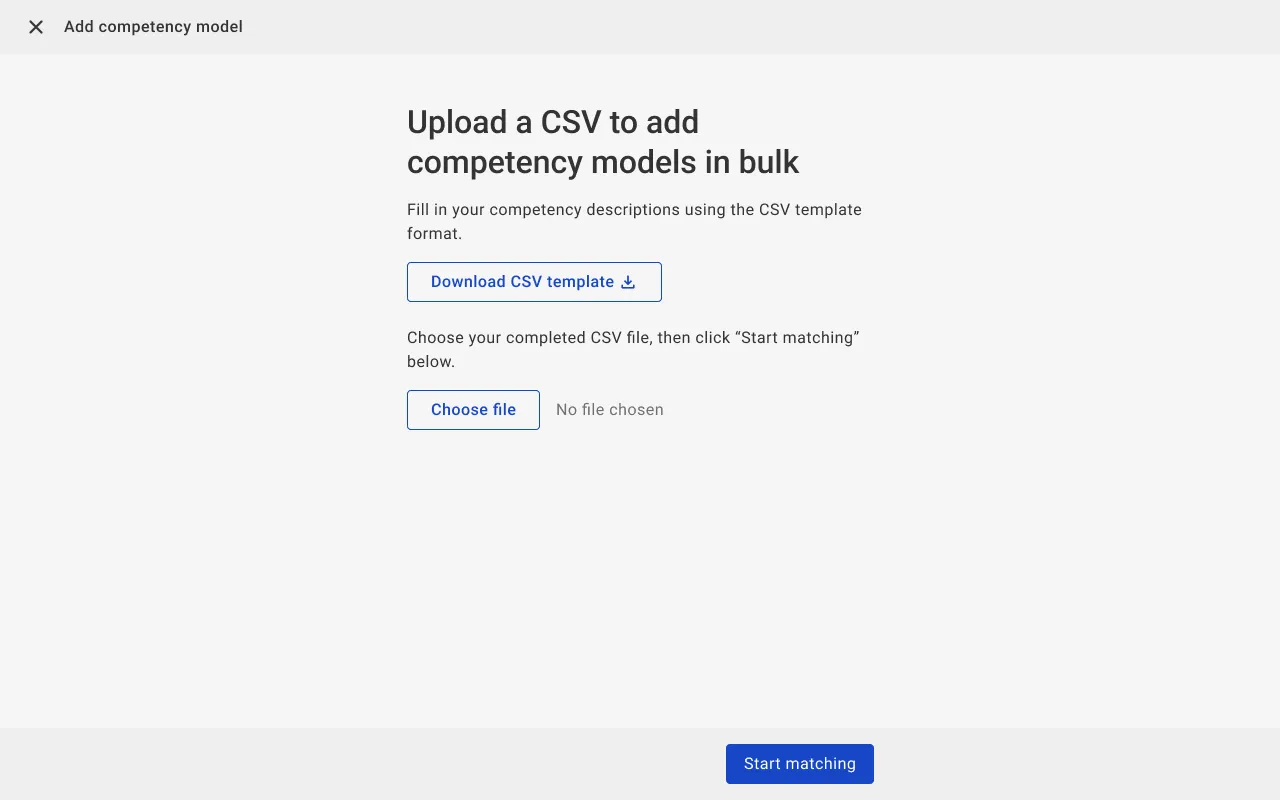
A company’s competency model usually covers multiple job levels, each with detailed criteria and competency descriptions, making the data structure complex and large. To address the core pain point found in the earlier interviews (HR had little time to spare), the PO and I planned a CSV bulk import feature so HR could upload many competency descriptions at once and skip tedious manual data entry.
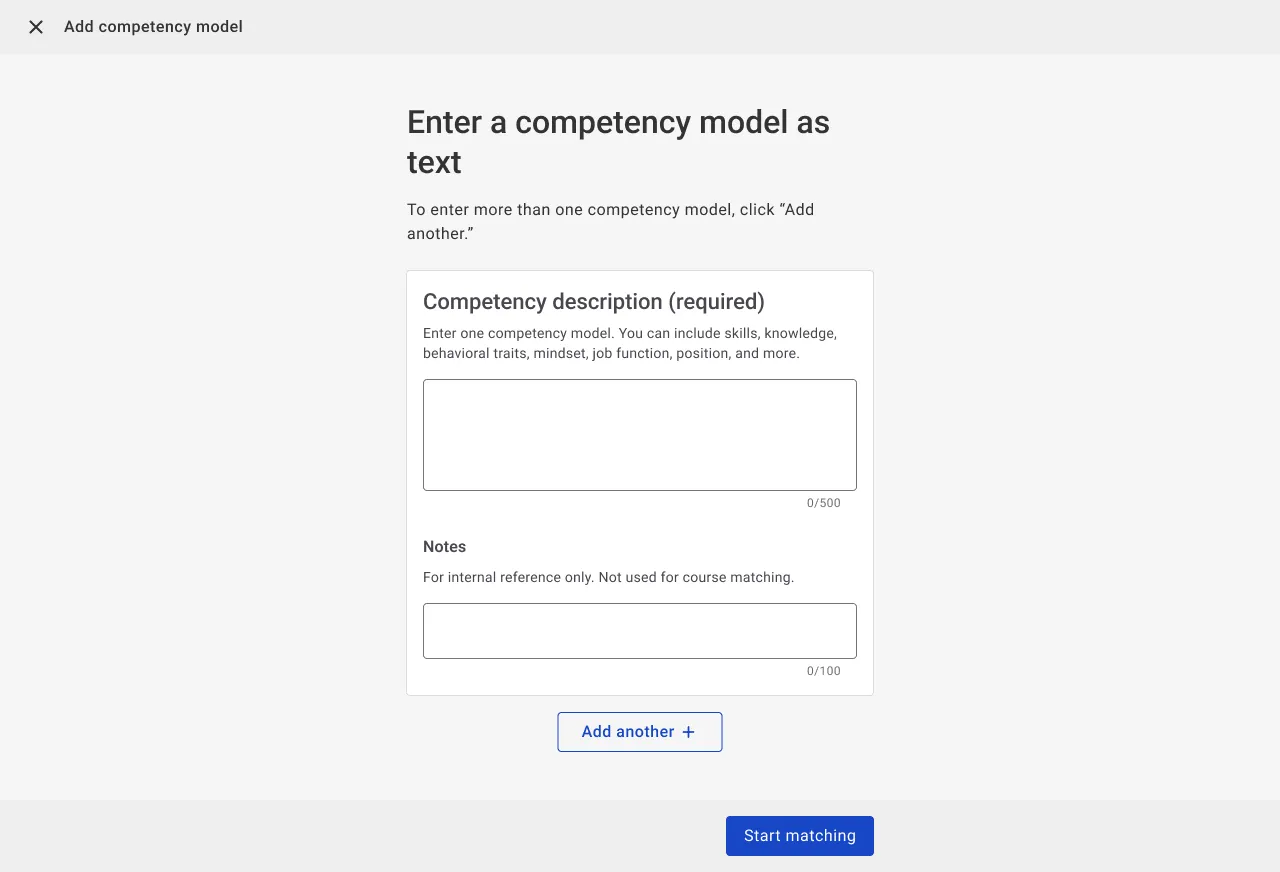
We also provided the option to enter a description as plain text: users can write a paragraph describing the skills or knowledge they want to develop and let AI match courses to it.
- Keeping manual editing flexible after matching
Although our design lets the AI and the tagging system handle the entire matching process, employees’ learning content ultimately has to meet the company’s actual expectations. So I kept HR’s ability to manually add or remove courses afterward, ensuring the learning content ultimately assigned to employees would fit the company’s talent development goals.
Because this feature was positioned as an experiment, the accuracy of mapping course tags to courses wasn’t perfect, and a match could still return more than ten courses. But compared with the previous process of manually filtering thousands of courses, this was already an order-of-magnitude improvement, so I concluded that this result was acceptable for the beta and left the final narrowing to HR’s editing step.
Outcomes
| Area | Outcome |
|---|---|
| Real adoption of the concept by corporate clients 🎯 | At the time, the corporate clients we interviewed made up our entire priority target segment. Half of them adopted C&C after the beta release and distributed the matched learning content to their employees. Some companies may have had CS run the tool on their behalf, but the final decision on whether to distribute the content to employees rested with each company. Compared with verbal expressions of interest, actually adopting it and distributing content is a stronger behavioral signal that the need is real. |
| Demonstrated the efficiency potential of automated matching 📊 | The course-tags-as-intermediary approach demonstrated that automated matching of competencies and courses is feasible at a controllable cost. However, this establishes technical feasibility, not business results. |
| Unexpected: changed how our CS team worked 💡 | We had expected the users to be corporate HR, but after launch, the team that used it most actively was actually our own CS team. See below. |
Unexpected: what the feature really reduced was CS workload
In the early interviews, we only saw the effort corporate HR spent assigning courses manually. After launch, however, the CS team’s many eager questions about the feature made us realize that the dedicated CS staff assigned to our large corporate clients were also spending considerable time on customized course assignment.
After C&C launched, some CS staff began using it to preview matching results as a starting point for meetings with their HR contacts at client companies. To help this unplanned use spread across the team, I also wrote a guide for the CS team on using the feature in the admin back end.
Because this use wasn’t part of the original measurement scope, I can’t provide quantitative data on how much time CS saved. What is certain is that the way our CS team worked did change because of this feature.
The validation boundaries of this beta
C&C was one of a series of projects the team pursued to move the internal coverage metric. It served as a pathfinder: the goal was to get real feedback from corporate clients quickly. So from the start, the team drew two boundaries:
- Whether the metric would improve was out of scope: The data science (DS) team judged that the factors affecting coverage mostly lay outside the product (such as how strongly HR promotes learning, or whether there are internal incentives to learn), making them hard for any single feature to move.
- The employee-side hypothesis was out of scope: Whether employees became motivated to learn depended on prerequisites, such as complementary features that hadn’t been released yet and links to performance reviews; this beta validated only whether the HR-side needs were real.
What happened next
After the beta launched, I returned to my original team on the learner side, so I didn’t track later iterations or long-term results. What I’ve presented here covers what I took part in, observed, and assessed during the beta period.